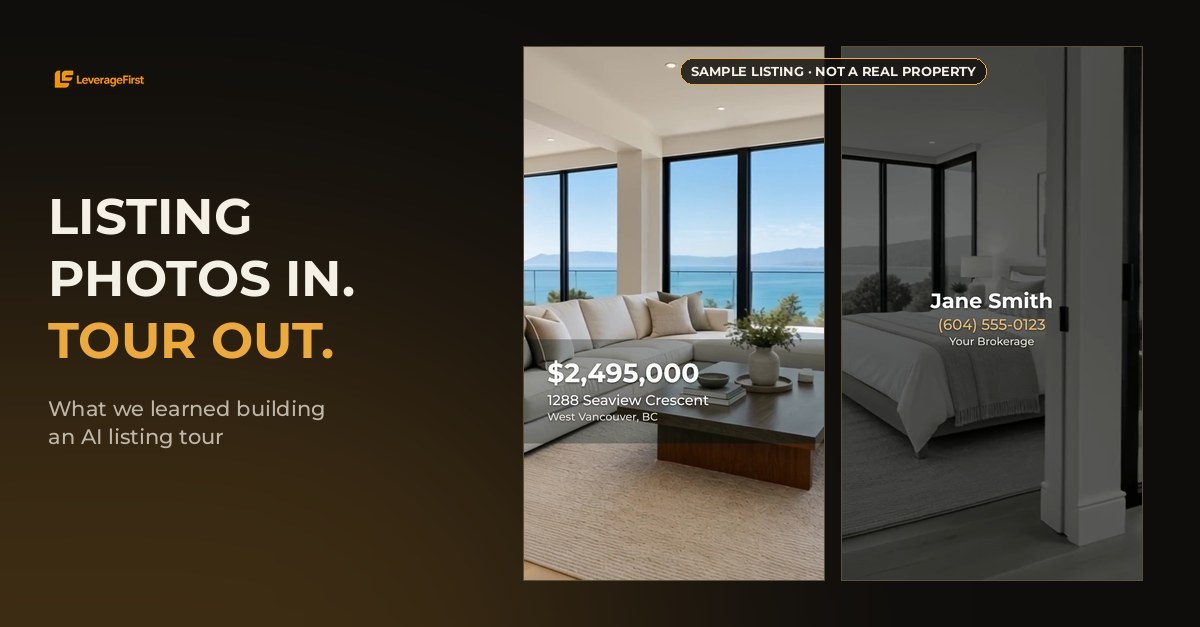
You can turn listing photos into a video with AI by having the AI film a short camera move between each pair of neighbouring photos, then cutting those moves together with price, address and agent cards. A 15-second vertical tour needs 4 to 7 photos and took about 2.5 minutes in our test. Two rules decide whether it looks real: keep every camera move between 3 and 5 seconds, and only put two photos next to each other if you could actually walk from one room into the other.
Key takeaways
- One move per photo pair. The AI films the path from each photo to the next, so the tour reads as one continuous walk.
- The 3-to-5 Second Move Rule. Longer moves stalled, then the AI started inventing rooms.
- The Doorway Rule. Neighbouring photos must share a real doorway or line of sight, or the camera flies through a wall.
- Crop before you generate. For Reels, crop each photo to vertical first so the AI films a true full-screen 9:16 video.
- Photo count sets the length. 15 seconds needs 4 to 7 photos; 60 seconds needs 13 to 20.
I built this workflow into LeverageFirst Studio this month, so everything below comes from our own test runs, including the ones that failed. The video below is the 15-second tour from our second test: four photos of a test listing, three camera moves, edited automatically.
How does AI turn listing photos into a video?
The AI does not invent a tour from one photo. It films the space between two of your photos. For every pair of neighbouring photos, the AI generates the camera move from one room to the next, like a gimbal operator walking through the home.
A listing with 6 photos becomes 5 camera moves. Because each move picks up where the last one ended, the whole tour reads as one continuous walk-through. The edit then adds the parts buyers actually look for: price and address up front, beds, baths and square footage, a few standout features, and the agent card at the end.
How many photos do you need for an AI listing video?
The length you want decides how many photos you need, because each camera move should last 3 to 5 seconds. These are the ranges we use in Studio:
| Tour length | Photos needed | Best for |
|---|---|---|
| 15 seconds | 4 to 7 | Instagram Reels, TikTok, Stories |
| 30 seconds | 7 to 13 | Reels and Facebook feed |
| 45 seconds | 10 to 19 | Listing page and YouTube Shorts |
| 60 seconds | 13 to 20 | Full walk-through for the listing page |
With too few photos, each move has to stretch past 5 seconds, which is where quality breaks. With too many, the edit speeds the tour up, and we cap that at 25% so it never looks rushed.
Why do AI listing videos walk through walls?
AI listing videos walk through walls when two neighbouring photos show rooms that are not connected. In one of our tests the tour went from the dining room straight to a bedroom on the other side of the house. The AI had to get from one photo to the next in a few seconds, so it took the shortest path: through the wall.
The fix is what I call the Doorway Rule: only put two photos next to each other if a buyer could physically walk from the first room into the second, or at least see it from where the camera stands. Order your photos the way you would show the home in person. Exterior, entry, living room, kitchen, dining, then down the hall to the bedrooms. Get the order right and the AI has a real path to follow.
How long should each AI camera move be?
Each AI camera move should be 3 to 5 seconds. That is the 3-to-5 Second Move Rule, and we learned it the expensive way. Our first test used 10-second moves between photos. The camera stood almost still for the first few seconds, then rushed to catch up and started inventing rooms that do not exist in the listing.
At 3 to 5 seconds, the camera starts moving right away and arrives at the next room without drifting. A slow, steady push between two real rooms is exactly what a professional gimbal shot looks like, which is why short moves read as filmed rather than generated.
Vertical or horizontal: which format should a listing video use?
Use vertical 9:16 for Instagram, TikTok and Stories, and horizontal 16:9 for the listing page, YouTube and email. The important part is when you make it vertical.
Our first vertical tour placed the horizontal photos inside a vertical frame with a blurred copy behind them. It looked like a reposted landscape video. Now each photo is cropped to vertical before it goes to the AI, so the AI films natively at 720 by 1280: sharp, full screen, no bars. If your hero shot has important detail on both edges, keep the whole-photo option for that tour instead.
What should an AI listing video show on screen?
Keep the text to what a buyer decides on in the first seconds. Every tour we produce follows the same order:
- Opening card: price, street address and city.
- Stats: beds, baths and square footage in one line.
- Up to three features: the view, the renovated kitchen, the suite. More than three and nobody reads them.
- Closing card: agent name, phone number and brokerage, with your logo held on screen.
- Music optional: we default to no music so you can add trending audio inside Instagram.
Because the video only moves between your real photos, it shows what is actually in the home. Our camera instructions forbid adding furniture, people or objects that are not in the photos. If your board has rules on AI-assisted marketing media, check them like you would for virtual staging.
How long does an AI listing video take and what does it cost?
Our 15-second test tour took about 2.5 minutes from upload to finished video. Longer tours take longer because there are more moves to film; we render four moves at the same time, so a 60-second tour with 13 to 20 photos runs in minutes, not days.
Cost scales with length and quality: a short vertical tour is the cheapest, and 1080p costs about twice as much as 720p because the higher-quality model costs twice as much per second to run. Either way, it is a fraction of booking a videographer, waiting for the edit, and paying again for a vertical cut. For brokerage pricing across all your listings, book a call.
Where AI listing video still falls short
AI tours are only as good as the photos you feed them. Very dark rooms and stretched wide-angle shots give the AI less to work with, and a photo set with gaps in the route (no hallway, no doorway shot) forces you to break the Doorway Rule. For luxury listings where the drone shot and twilight exterior sell the home, AI tours work best alongside your photographer, not instead of them. Use AI for speed and volume: every listing, every price change, every open house, in the same afternoon.
Frequently asked questions
Can AI turn listing photos into a video?
Yes. AI films a smooth camera move between each pair of neighbouring photos, and the moves are cut together into one tour with price, address and agent cards. Our 15-second test used 4 photos and took about 2.5 minutes.
How many photos do I need for an AI property tour?
For 15 seconds you need 4 to 7 photos, for 30 seconds 7 to 13, for 45 seconds 10 to 19, and for 60 seconds 13 to 20. Each camera move lasts 3 to 5 seconds, which is what sets the range.
Why does my AI house tour go through walls?
Two neighbouring photos show rooms that are not connected, so the AI takes the shortest path between them. Order photos in the real walking route of the home so every pair shares a doorway or line of sight.
Should a listing video be vertical or horizontal?
Vertical 9:16 for Instagram, TikTok and Stories; horizontal 16:9 for the listing page, YouTube and email. Crop photos to vertical before the AI films them so the result is sharp and full screen.
Does an AI listing video add things that are not in the home?
It should not. The camera only moves between your real photos, and our instructions forbid adding furniture, people or objects. Short 3 to 5 second moves also stop the AI from inventing rooms.